Building contain-yourself: A Dockerized MCP Sandbox for AI Security Agents
How I wrapped standard Linux networking utilities in Model Context Protocol (MCP) servers and Docker containers to give LLMs safe, structured access to recon tools.
Why I Decided to Do This
We’re in an era where AI agents can reason through complex workflows, but giving them raw, unrestricted shell access to run security and networking tools is a recipe for disaster. If you’ve ever watched an LLM hallucinate a flag for nmap or decide to enthusiastically run ffuf against a /8 subnet without rate limits, you know exactly what I mean.
The gap was obvious: LLMs need access to standard Linux utilities to perform meaningful reconnaissance, but they need guardrails. I needed a way to expose complex CLI tools like httpx, subfinder, and nuclei to AI agents, but with strict safety limits, structured JSON outputs instead of messy stdout, and absolute host isolation.
Architecture/System Design
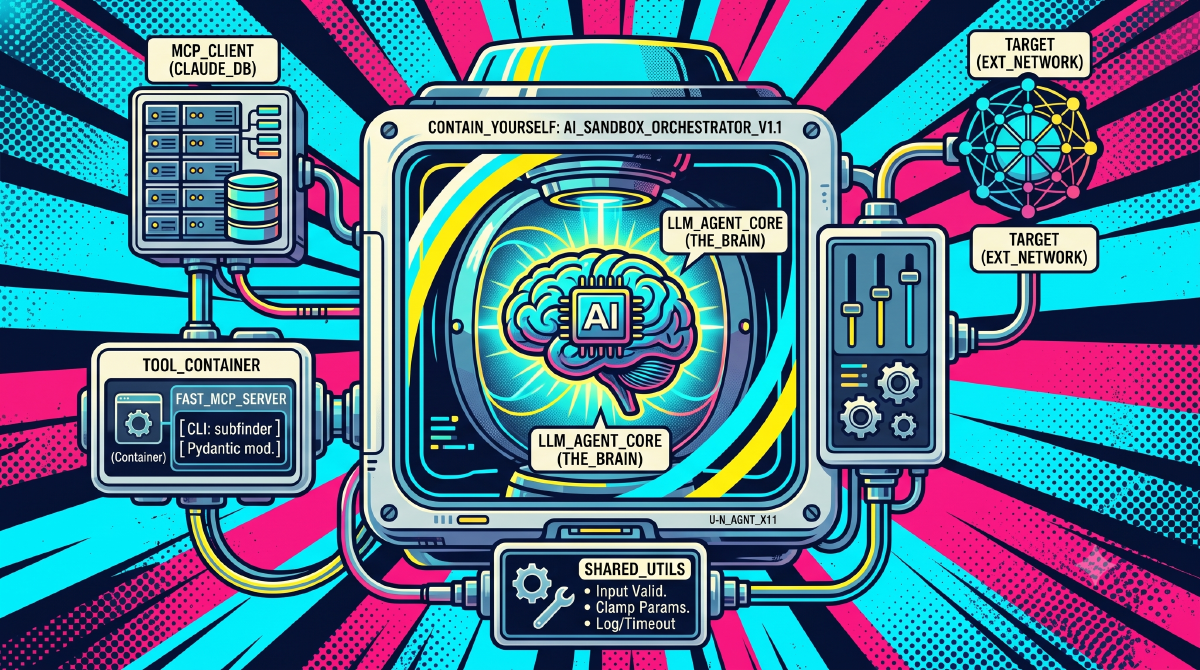
contain-yourself bridges the gap between unpredictable AI agents and raw command-line binaries by wrapping them in Model Context Protocol (MCP) servers.
The system relies on three core architectural pillars:
- MCP Interface: We use FastMCP (
mcp>=1.0.0) running on Python 3.12 to expose tools to compatible clients (like Claude Desktop). This provides a typed, clean interface where tools declare their required parameters, and the agent natively understands what inputs are expected. - Dockerized Isolation: Every single tool gets its own container. Whether it’s
domain-mcpdoing WHOIS lookups orgowitness-mcpfiring up headless Chromium for screenshots, it happens in a sandbox. There is zero host access. - The Shared Utility Layer: To prevent resource exhaustion, all servers leverage a shared
utils.pymodule. This enforces strict constraints:MAX_TARGETSlimits, numeric parameter clamping (e.g., bounding concurrency threads), and hard subprocess timeouts.
Implementation Details
The meat of this build was wrangling heavily optimized Go and C binaries into a uniform Python/Docker wrapper.
For compiled tools from ProjectDiscovery (like httpx, subfinder, nuclei), I used a multi-stage Docker build pattern. We compile the binary in a Go Alpine builder, then copy it into a lightweight Python 3.12 slim runtime managed by uv. This keeps image sizes manageable while isolating the execution environment.
# Snippet from subfinder-mcp/Dockerfile
FROM golang:1.22-alpine AS builder
RUN go install github.com/projectdiscovery/subfinder/v2/cmd/subfinder@latest

FROM python:3.12-slim
COPY --from=ghcr.io/astral-sh/uv:latest /uv /usr/local/bin/uv
COPY --from=builder /root/go/bin/subfinder /usr/local/bin/

WORKDIR /app
COPY requirements.txt .
RUN uv pip install --system --no-cache -r requirements.txt
COPY shared/utils.py .
COPY subfinder-mcp/server.py .

EXPOSE 8000
CMD ["python", "server.py"]
On the Python side, the biggest hurdle was ensuring the LLM received predictable data. Earlier iterations returned stringified dicts, which occasionally led to schema drift. By upgrading the FastMCP tools to return strictly typed Pydantic BaseModel instances, the agent knows exactly what to expect.
Here is what the safety wrapper looks like in practice. Notice how we use the shared utilities to clamp inputs before the subprocess ever fires:
@mcp.tool()
def enumerate_subdomains(
    domains: list[str],
    threads: Optional[int] = 10,
    timeout: Optional[int] = 30
) -> SubfinderResponse:
    """Passively enumerate subdomains for a list of root domains."""

    # Enforce safety limits
    if not domains:
        return SubfinderResponse(error="No domains provided.")

    if len(domains) > MAX_TARGETS:
        return SubfinderResponse(error=f"Too many targets. Maximum is {MAX_TARGETS}.")

    safe_threads = clamp(threads, 1, 50)
    safe_timeout = clamp(timeout, 5, 120)

    # ... execute subfinder subprocess ...
Key Takeaways/Lessons Learned
- Parsing CLI output is a dark art: Getting clean JSON out of tools that were designed to print colored ASCII art to standard out is tedious. Parsing
nmapXML output into a clean JSON structure for an LLM was easily the most annoying part of the build, but absolutely necessary for agent comprehension. - Base64 is a superpower for agents: For the
gowitness-mcptool, passing back base64-encoded PNG strings directly in the JSON response allowed multimodal agents to “see” the web pages they were scanning without needing volume mounts or external image hosting. - What I’d do differently: Right now, there are 11 individual Docker containers, which means 11 MCP servers to attach to a client. While docker-compose handles the orchestration nicely over
streamable-http, managing the config files for standard stdio MCP clients (like Claude Desktop) is bulky. Grouping related tools into single “domain-specific” containers (e.g., a singlerecon-mcpserver) might simplify deployment in the future.